
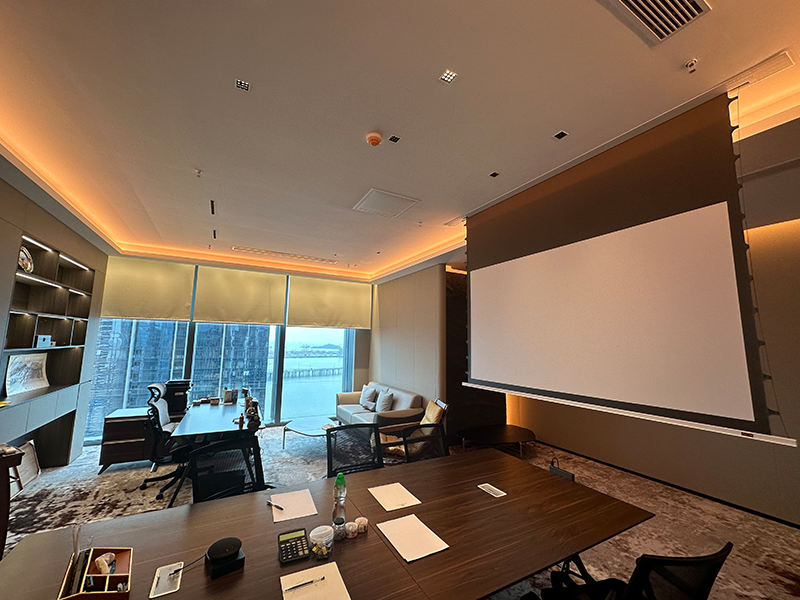
As of February 5, 2026, “invisible tech” remains a dominant force in global interior design, and In-Ceiling Projection Screens—especially custom in-ceiling recessed projection screens—have become the top choice for homeowners and businesses aiming to blend AV gear with decor. For AV integrators, mastering the installation of these slim in-ceiling projection screens isn’t just a skill—it’s a way to stand out in a competitive market. But let’s be real: one wrong move (like miscalculating ceiling space or botching power wiring) can turn a simple job into a costly nightmare. Having collaborated with ZSM’s engineering team to refine installation best practices for 2026, this guide breaks down everything you need to know, from model selection to maintenance.
Selection & Preparation: The 2026 Integrator’s Checklist
Getting the prep right saves 80% of headaches later. Here’s what you can’t afford to skip:
| Consideration | Key Details (2026 Updates) | ZSM Advantage |
|---|---|---|
| Size Distinction | Case Dimension (housing + motor) = Viewing Area + 5-8cm. For a 120-inch 16:9 screen, viewing area is 2654x1491mm. | 4K compatible in-ceiling recessed projection screens come with labeled size guides to avoid mix-ups. |
| Ceiling Depth Requirement | Minimum 8cm for slim models; 10cm for screens with built-in smart controls. | Ultra-thin housing (8cm max) fits 95% of modern ceiling cavities. |
| Material Selection | Anti-glare fabrics for bright spaces; acoustically transparent options for hidden speakers. | In-ceiling projection screens with bottom access pair with 4K woven acoustic screen for uncompromised sound/image. |
- Don’t Overlook Joist Spacing: In 2026, more homes use 60cm on-center joists—ZSM’s adjustable mounting brackets can span gaps up to 70cm, so you won’t need extra reinforcement.
- Smart Control Compatibility: Clients now demand seamless integration with smart homes. Ensure the screen supports 12V Trigger, RS232/485, or WiFi (ZSM’s 2026 models add Matter protocol support for broader compatibility with Google Home and Alexa).
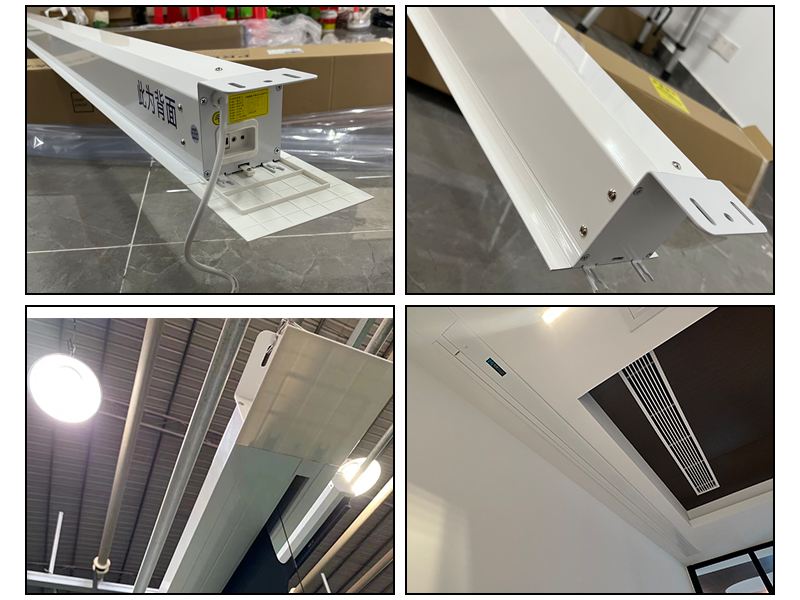
Installation Best Practices: Step-by-Step for Success
Installing in-ceiling projection screens for commercial spaces or residences follows the same core principles—here’s how to do it right:
- Map Ceiling Structure First: Use a 2026-era stud finder with depth detection to locate joists and avoid pipes/wires. Mark the cutout with a template (included with ZSM screens) to ensure straight edges.
- Mount with Precision: Use ZSM’s reinforced threaded rod brackets to attach the housing to joists. Fine-tune level with a digital level—even 1mm of slant will distort 4K images.
- Power & Control Wiring: Run power to the left/right of the housing (2026 code requires GFCI outlets for residential installs). For smart-controlled in-ceiling projection screens, pre-wire Cat5e cables if WiFi signal is weak in ceilings.
Calibration & Maintenance: 2026 Pro Tips
Once installed, calibration and easy access make all the difference:
- Limit Setting: Use ZSM’s 2026 digital adjustment tool to set drop height—no more manual dials. Sync it with the projector’s throw distance for a perfect fit every time.
- Tab-Tensioning: ZSM’s updated tensioning system keeps fabric flat for 10+ years—critical for 8K projections (growing in popularity in 2026). Curled edges? You won’t see them here.
- Bottom Access Game-Changer: The biggest complaint from integrators used to be ceiling demolition for repairs. ZSM’s in-ceiling projection screens with bottom access let you swap motors or fix issues through the bottom cover—no drywall damage, no client complaints.
Q&A: Common Questions AV Integrators Ask in 2026
Q: Can I install an in-ceiling screen in a popcorn ceiling?
A: Yes—just use a drywall patch kit to create a smooth cutout first. ZSM’s trim kits hide edges, so the screen blends with textured ceilings.
Q: How do I handle ceiling insulation around the screen?
A: Use fire-retardant insulation (required in 2026 building codes) and leave 5cm of space around the housing for ventilation—overheating ruins motors.
Q: Are these screens suitable for outdoor-covered patios?
A: Opt for ZSM’s weather-resistant in-ceiling models (launched in 2025) for covered spaces—they handle humidity and mild temperature swings.
By 2026, In-Ceiling Projection Screens are no longer a luxury—they’re a standard. With ZSM’s user-centric designs and these updated tips, you’ll deliver installations that wow clients and reduce callbacks. Need 2026 CAD drawings or Matter protocol specs? Download ZSM’s In-Ceiling Series Datasheet or contact our support team—we’re here to help you stay ahead of the curve.
 Scan QR Code
ZSMSCR Facebook
ZSMSCR Instagram
ZSMSCR X
ZSMSCR YouTube
ZSMSCR TikTok